🇺🇸 English· 🇲🇽 Ver en Español
← All features 📅 Scheduling & Dispatch 📋 Quotes & Estimates 🧾 Invoicing 💳 Flusso Pay 👥 Client Management 🔄 Service Plans ✍️ Contracts & E-Sign 📦 Inventory 💰 Commissions ✅ Tasks 🧑‍🔧 Team Management 📊 Analytics 📈 Job Profitability 🤖 Opi AI Assistant Pricing
Log in Get started →
🤖 Opi — AI Assistant

Stuck on a screen?
Just ask Opi.

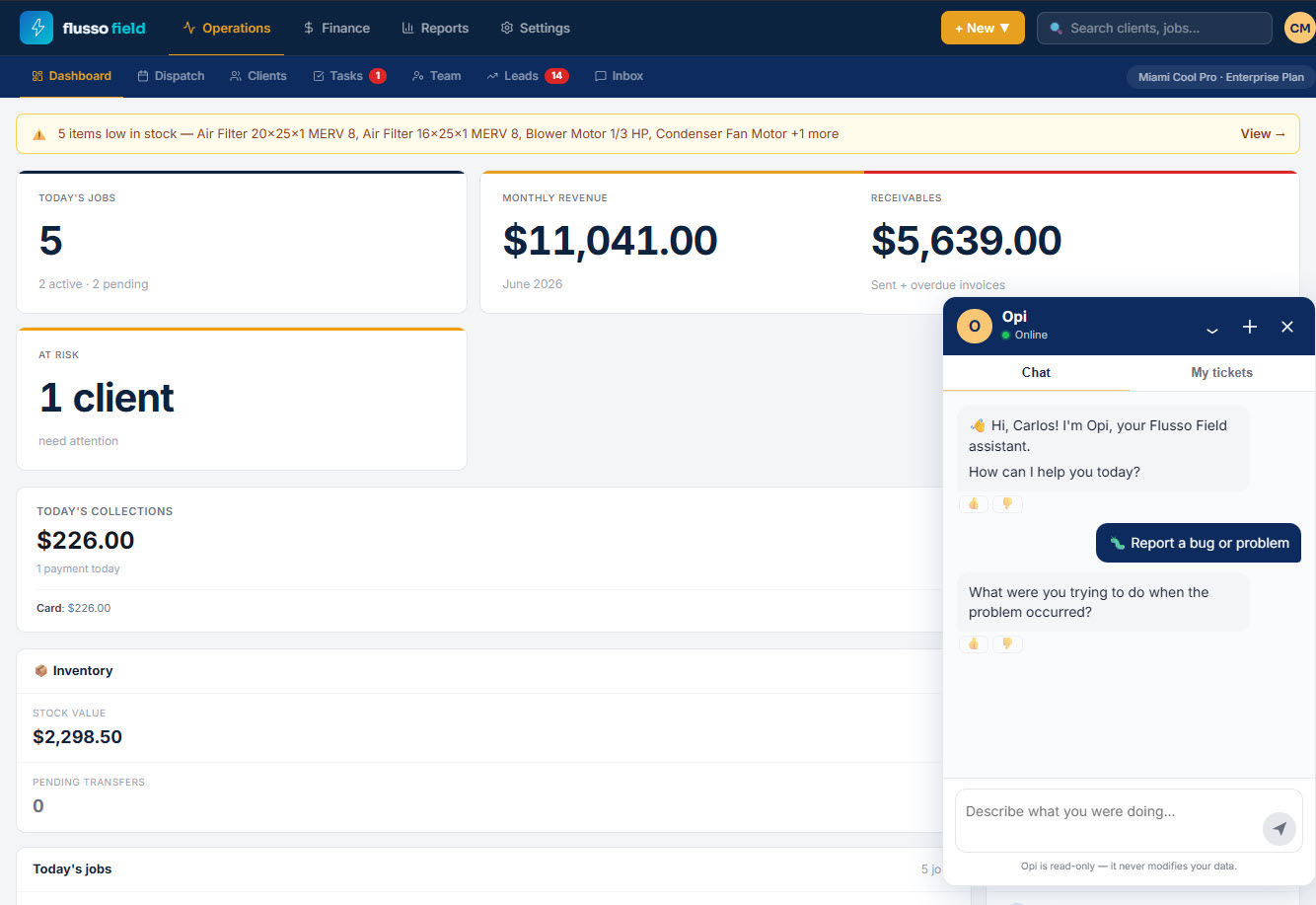
Opi is your built-in AI assistant — a chat widget on every screen, in English and Spanish. It's read-only: it never creates, edits or deletes your data. Instead it walks you through the task, step-by-step, until it's done. Starting at $27.97/mo.

Read-only — never changes your data English & Spanish On every screen
app.flussofield.com/dashboard
Opi AI assistant
Read-only
It guides you — it never
touches your data
EN + ES
Bilingual help for your
whole team
Step-by-step
Clear numbered steps
on every screen
How-to Guidance

It won't do it for you —
it shows you how.

Tap the OPI button in the bottom-right corner and Opi greets you with a quick menu. Ask how to do almost anything in the platform and it walks you through it, step-by-step. Need to create an invoice? "I can't create the invoice directly, but I'll walk you through it — takes about 2 minutes," then numbered steps you follow yourself.

  • Quick-start actions: create a client, schedule a job, create an invoice
  • Record a payment or invite a technician, guided start to finish
  • Clear numbered steps you can follow on your own screen
  • Because it's read-only, it can never break or change anything
How do I create an invoice?
I can't create the invoice directly, but I'll walk you through it — takes about 2 minutes.
1 Open Finance → Invoices
2 Tap "+ New Invoice"
3 Pick the client and add line items
Review and send — done
Four ways to help

More than answers —
a way to be heard.

Opi's welcome menu offers four paths. Get how-to guidance, report a bug or problem, share an idea or suggestion, or just write your own question and ask anything about the platform. When you report a bug, Opi asks what you were doing and opens a support ticket you can follow in the "My tickets" tab.

  • How to do something — step-by-step platform guidance
  • Report a bug or problem — opens a tracked support ticket
  • Share an idea or suggestion with the Flusso team
  • Write your own question and ask anything
  • Follow every ticket you've opened in the "My tickets" tab
Opi · welcome menu
📘 How to do something in the platform
🐞 Report a bug or problem
💡 Share an idea or suggestion
✍️ Write your own question
Faster onboarding

New techs get unstuck —
without calling you.

A new technician or office hire doesn't have to phone the owner every time they're unsure. Opi is right there on every screen, answering in English or Spanish, so people get moving on day one. Onboarding is faster, and because Opi is read-only, a curious new user can never break anything by asking.

  • Bilingual — answers in English or Spanish automatically
  • New staff onboard faster and self-serve their questions
  • Fewer interruptions for owners and managers
  • Read-only by design — exploring is always safe
Safe by design
Never creates, edits or deletes records
Guides you instead of acting for you
Answers in English & Spanish
Available on every screen, bottom-right
Opi — AI Assistant

Help on every screen.
In two languages.

An in-app, read-only AI assistant that guides your whole team step-by-step. Included in every plan. 30-day money-back guarantee — no questions asked.

Get started — from $27.97/mo → See pricing
30-day money-back Cancel anytime No contracts